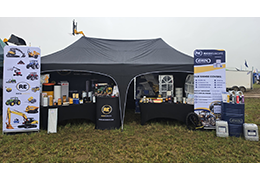
We'd like to say a huge thank you to everyone who visited the RICO Europe stand over the two-day event.
How to Use the RICO Europe Oil Finder Tool
At RICO Europe, we are excited to introduce our latest innovation designed to simplify your machinery maintenance—our brand-new Oil Finder Tool.
This guide will walk you through using the tool to its maximum potential, ensuring you find the right lubricants quickly and efficiently.
Step 1: Accessing the Oil Finder Tool
To begin, navigate to the RICO Europe homepage.
You will find the Oil Finder Tool conveniently located in the header, next to our Cross Reference and Part Finder tools.
Click on the 'Oil Finder' to get started.
Step 2: Selecting the Manufacturer
Once on the Oil Finder page, you'll see a drop-down menu labelled "Select Manufacturer." Start typing the brand of your machine in this field. Our tool is designed to be user-friendly, allowing you to quickly find your manufacturer by typing just a few letters.
Example:
If you are looking for a lubricant for a Kubota machine, type "Kubota" into the drop-down, and the option will appear for you to select.

Step 3: Choosing the Model
After selecting the manufacturer, the next step is to choose the specific model of your machinery. A list of models associated with the selected manufacturer will appear. Simply scroll or type to find your model.
The model will reference, the engine and serial number if available in our database.

Note:
If your model isn’t listed in our database, don't worry! Please get in touch with our team, and we will help source the correct lubricants for your machinery.
Step 4: Understanding the Search Results
Once you’ve selected both the manufacturer and model, click the ‘Search’ button to view the recommended lubricants. The search results are categorised to make it easy for you to find exactly what you need.
Categories:
- Engine
- Hydraulic / Transmission
- Gear
- Grease
- Cooling System.
Each category will display:
Product Image: A visual representation of the lubricant.
Preferred Lubricant Option (1-4): Ranked in order of recommendation.
Notes: Information on where to apply the lubricant and the required capacity.
Product Reference: Links back to the product page for detailed information.
Product Description: A brief overview of the lubricant.
Stock Levels: Current availability.
Price: The cost of the lubricant.
Add to Basket: An option to purchase the lubricant directly.
Example:
If you search for a Kubota U27-4, the results will show the recommended lubricants for each part of the machine, such as the engine, hydraulic system, and more.
Step 5: Viewing Alternative Lubricants
If you wish to explore other options, toggle the ‘Show Options’ button. This will reveal secondary lubricant choices, ranked from 1 to 4:
1 = Preferred Option
2 = Secondary Option
3 = Third Option
4 = Fourth Option.
These rankings are consistent across all results in the Oil Finder database, helping you make an informed decision.
In many cases we list more than one oil for your vehicle. Multiple products are recommended where more than one oil in the range meets or exceeds the performance standards required. All oils recommended are suitable for your vehicle, and any listed oil may be used.
Video: How to Use the RICO Europe Oil Finder
Start Using Today!
The RICO Europe Oil Finder Tool is designed to make your machinery maintenance as seamless as possible.
By following these simple steps, you can quickly identify the best lubricants for your machinery.
If you need any assistance or have questions, our team is always ready to help.